Thank you for the tip!
D
Offline
Posts
-
RE: Recording from speakers on a Dell PC in Vista and Windows 7
-
RE: Can someone with a Mac view my broadcast?
To view the broadcast, Mac users will need the Windows Media Player for the Mac. They can download it here:
https://www.microsoft.com/windows/windowsmedia/player/mac/mp9/default.aspx -
RE: How do I convert my AVI recordings to WMV?
In My Screen Recorder Pro, click on Tools >> Convert to convert your AVI recordings to WMV.
-
RE: Changing the captured time when monitoring for noise
The minimum recording time in WebCam Monitor is 1 minute. If noise continues past the 1 minute time, WebCam Monitor will continue recording until there is silence.
-
RE: How I can record microphone and speaker at the same time?
My Screen Recorder can record audio from the microphone and PC speakers both at the same time.
To capture the audio playing on the PC and your microphone, click the Record icon from the tool bar. Select the option to Record microphone audio and Record system audio. Then click the OK button to start recording.
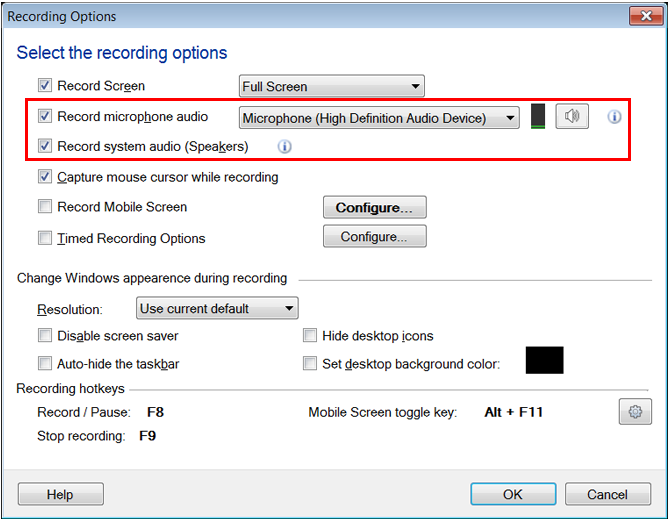
Whenever you will start recording, the audio played on your PC and microphone will be recorded.
Note: Please make sure at least one playback device is enabled.
-
RE: How do I view my camera from the internet?
You will need to enable Port Forwarding. We have an article that explains how to setup WebCam Monitor so you can view your camera from the internet. You can read it here.
-
RE: Schedule past midnight and stop on a different day?
Click on Tools >> Scheduler, then click Add. You can set a one time schedule to start monitoring, recording, taking photos, or broadcasting, on Monday at 8PM and end on Tuesday at 8AM. You can also have a recurring schedule that will begin at 8PM and stop at 8AM. Remember to use 24 hour format for the time.
Read more about scheduling cameras here.
-
RE: Motion detection is too sensitive
The sunshine is probably varying, for instance when a cloud passes in front of the sun, which is detected as motion. Cars driving by and trees waving in the wind can also cause alerts.
You can use the Mask function to block out any objects that are likely to move. If you still get too many false positive alerts, you may want to consider using continuous recording and no email alerts. You can then examine the recordings at the end of each day.
-
RE: Remote monitoring, viewing, and recording
Security Monitor Pro, can record your 4 cameras from a remote location. We have published an article that you may find helpful:
https://www.deskshare.com/Resources/articles/smp_MultiplePCs_Backup.aspxYou can preview the cameras, record them to your external hard drive, and also broadcast their video feeds all simultaneously.
-
RE: Is there a way to decrease sensitivity below the minimum?
You can avoid this problem using masking. If you mask the area of the Preview that shows the tree with waving branches, this should stop the false alerts.
We have published an article on how to use Masking, which you can read here: Avoid False Alarms with Masking.
-
RE: Cabin with very low bandwidth
WebCam Monitor will monitor and record from one camera at a time. If you would like to use multiple cameras at the same time, please evaluate Security Monitor Pro.
Security Monitor Pro can simultaneously monitor 3 cameras, with motion detection. Since you want to minimize bandwidth, you should set the program to take 1 or 2 pictures every time it detects motion and email you the photos. Emailing photos will use much less bandwidth than uploading recorded video.
-
RE: Not all voices are available when I insert a voice change
Text Speaker works with two types of voices, SAPI 4 and SAPI 5. All AT&T Natural Voices are SAPI 5. Only SAPI 5 voices are listed when you "Insert Voice Change".
-
RE: Using AT&T Mike & Crystal voices included with Text Speaker
To download the voices, log in to your My Account page here:
https://store.deskshare.com/login.aspxAfter you log in, click on Account at the top right of the window, then click Digital Goods. There will be links there to download Mike and Crystal.
Voices are large files, and the download may take some time.
To install a voice, double-click it, then complete the installation wizard. When you click Finish it will be ready to use. You will have to close and restart Text Speaker before you can use your new voice.
Text Speaker MUST be installed before installing the voices. The voice installation will not complete unless Text Speaker is already installed.
NOTE: If you prefer to receive the voices on DVD-ROM, please purchase a disc from this page: https://www.deskshare.com/softwarecd.aspx. After completing the transaction, use the Contact Form to inform us that you would like Mike and Crystal on DVD. Please include your Order Number with this request.
-
RE: Resuming of incomplete downloads on next connection
The current version of Auto FTP Manager does not have the ability to resume downloads in an automated transfer. You can resume the download manually in the Quick Connect File Manager.
Thank you for the suggestion. The ability to resume downloads during automated transfers will be added to version 5. Your suggestion is very valuable to us, as we work to make Auto FTP Manager more useful.
-
RE: Unable to set up email alerts
The message
 > AUTH LOGIN
 < 502 Command is locally disabled
means that the mail server you are using does not require a user name and password. Click Tools >> Options >> Monitoring >> Configure Email /SMS Notification >> Settings. Uncheck "My Outgoing Mail Server requires login" and click OK.
This should end the problem you are experiencing and permit you to send email alerts.
-
RE: Running as a Windows Service?
Development of Auto FTP Manager 5 is taking longer than we expected. This is a major upgrade. There are many new features that need to be created properly and fully tested.
At this point, we expect to release version 5 by the end of July.
-
RE: WebCam Monitor detects USB camera but does not preview
The problem may be that the camera is using an unsupported resolution. Please use the software that came with your camera to reduce the resolution to 1024x768 pixels or less. Restart WebCam Monitor and see whether you can now preview the camera.
-
RE: Maximum Length of Video Recordings
In version 5.15 of WebCam Monitor, the maximum video recording length is 3540 seconds, which is 59 minutes.
As an owner of version 4, you are entitled to a discounted upgrade price. To receive the discount price, click Help >> Check for Upgrades in WebCam Monitor.
-
RE: SMS alert when email is sent
WebCam Monitor can send email when an alert is triggered. Most mobile phone companies offer an email-to-SMS service. You can send email to a specific address and have it delivered to your phone as a text message. For instance, the Spanish phone company Movistar uses ####@correo.movistar.net. Substitute your mobile number for "####" and your WebCam Monitor alerts will be delivered to your Movistar phone. There is no charge for this service beyond the normal cost of receiving a text message.
-
RE: Linksys WVC200 MJPEG 640x480 bottom 25% of image corrupt
For some reason, this particular camera works differently than other IP cameras in 640x480 mode. We do not have a fix for the problem.
Other LinkSys cameras on our supported list work correctly with WebCam Monitor and Security Monitor Pro. This problem only applies to the WVC 200.