You can adjust the playback speed from Media Analyzer in Security Monitor Pro.
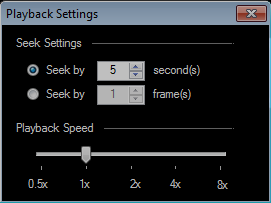
Select the 'Media Analyzer' option on tool bar and maximize the media analyzer window. Click on ‘Playback Settings’ icon from the preview controls.
On Playback settings, you can adjust the playback speed using the slider. This will change the playback speed instantly for the video being played.