Turn off auto playback after saving a screen recording
-
Whenever I finish and save a video recording, the video is played automatically in full screen. Is there any way to disable the auto playback?
-
The default setting in My Screen Recorder is to play a recorded video after saving the file. This allows you to review your recording.
You can disable the auto playback option from the Save Recording dialog. When you save the recording, uncheck the Play video after saving option and click on the Save button.
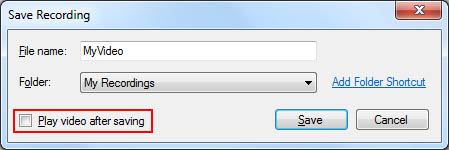
Going forward, your screen recordings will be saved and listed in the list view. It won’t play automatically.
Hello! It looks like you're interested in this conversation, but you're not signed in.
Sign in with your Deskshare account to ask a question, reply, and get an email when someone answers. You will come back to exactly where you left off.
With your input, this post could be even better 💗
Register Login