Downloading voices for native languages in Text Speaker
-
I am testing the evaluation version of Text Speaker. I want to try a voice for the German language. Where do I get voices to test in Text Speaker?
-
Text Speaker can read aloud text in different languages if you have the appropriate voice installed.
You can download trial voices on the Deskshare website for a number of different languages.
Once you download a voice, simply install it and launch Text speaker.
To change the active voice in Text Speaker, click Tools >> Voice. The installed voice will be listed in the ‘Select Voice’ dropdown list on the Voice Options dialog. Select the voice and click the Test Settings button to test the voice.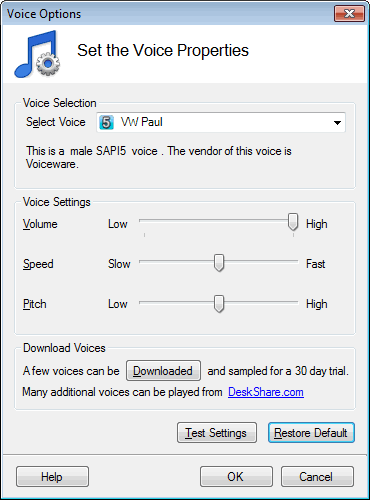
Hello! It looks like you're interested in this conversation, but you're not signed in.
Sign in with your Deskshare account to ask a question, reply, and get an email when someone answers. You will come back to exactly where you left off.
With your input, this post could be even better 💗
Register Login