Download files from selected sub-folders on the server
-
Can I use Auto FTP Manager to download files from a few sub-folders on the FTP root folder?
-
Auto FTP Manager has File and Folder Filters to exclude the specific folders during file transfer. This will allow you to select only the required folders for file transfer.
First, you will have to create a connection profile.
When you create the automated connection profile, go to Automated Transfer Settings >> File and Folder Filters >> Configure. On the Configure Filters dialog, check the option for Select folder to exclude and click on the Exclude Folders under the FTP server section. Select the folders from which you want to exclude from the transfer. Click OK to save the changes.
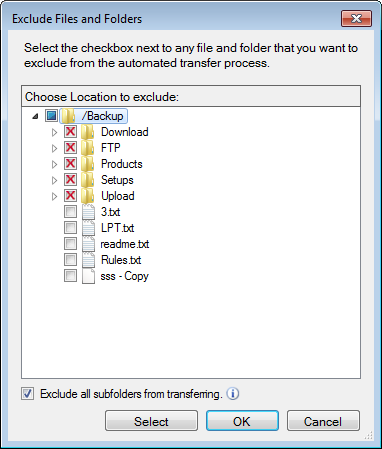
Whenever you start the automated transfer, the selected folders will be excluded from the transfer. The files will be downloaded only from the non-excluded folders.
Hello! It looks like you're interested in this conversation, but you're not signed in.
Sign in with your Deskshare account to ask a question, reply, and get an email when someone answers. You will come back to exactly where you left off.
With your input, this post could be even better 💗
Register Login