Send regular email alerts from Security Monitor Pro
-
I have three IP cameras. All are previewing in Security Monitor Pro. My question - Can I receive an email notification from my IP cameras regularly? Can you explain how to do this?
-
You can perform regular interval monitoring with e-mail notifications in Security Monitor Pro. You can also capture photos, videos and upload those to FTP server at predefined time intervals.
To configure the email notification action, click Camera >> Manage Cameras. Select a camera from the list and click on the Edit Camera button. On the actions tab, choose the ‘At Regular Intervals’ monitoring option and set the time interval. Select the Email Notifications check box and provide the email address, authentication, and email server details.
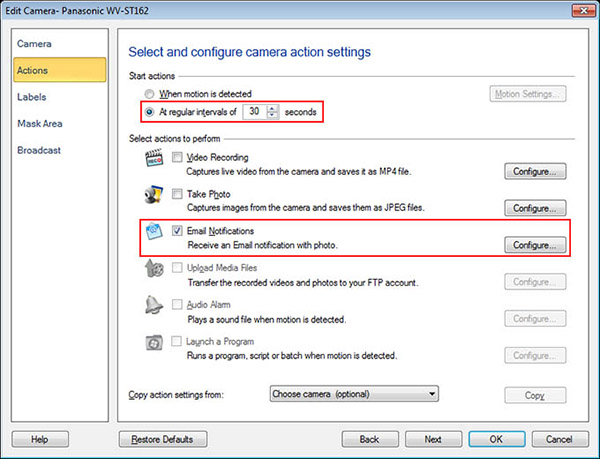
After configuring the action, right click on the camera preview and start monitoring the camera. The emails will be sent regularly to the email address you specified.
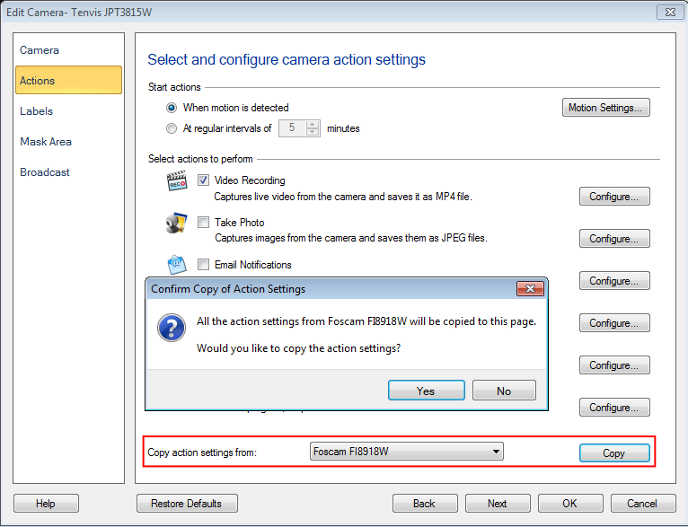
Note: Once you configure the settings for one camera, you can copy those actions for other cameras.
Hello! It looks like you're interested in this conversation, but you're not signed in.
Sign in with your Deskshare account to ask a question, reply, and get an email when someone answers. You will come back to exactly where you left off.
With your input, this post could be even better 💗
Register Login