Changing the quality of video broadcasting in WebCam Monitor
-
Is there any way to change the streaming video quality in WebCam Monitor? I am starting the broadcasting from my PC and watching it from another machine, but I want higher video quality. One PC is at home, and the other is at my office.
-
You can adjust the broadcast video quality from the Edit camera settings in WebCam Monitor.
To adjust the quality, right click on the camera preview and select the Edit Camera option. Go to the Broadcast tab and select the Broadcast profile from the drop down list. You can select the ‘Very high or Best quality video’ option. Click the OK button and save the settings. I also suggest increasing the broadcast video size.
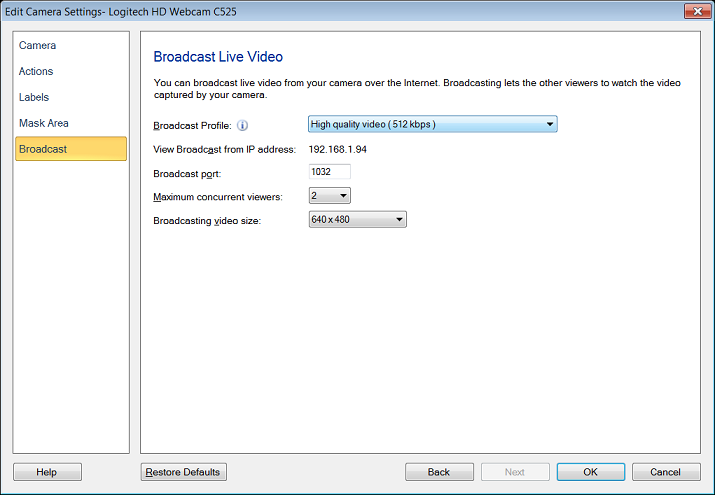
Please note that the selection of Broadcast profile is also dependent on your network’s bandwidth. Your network bandwidth must be higher than the bitrate shown in the profile.
For more information, see this link:
https://www.deskshare.com/help/wcm/SelectBroacastingProfile.aspx
Hello! It looks like you're interested in this conversation, but you're not signed in.
Sign in with your Deskshare account to ask a question, reply, and get an email when someone answers. You will come back to exactly where you left off.
With your input, this post could be even better 💗
Register Login