Downloading files that were modified today
-
I have created an automated profile for downloading files from an FTP server. Now, I want to download only the files that got updated today. What settings should I use?
-
You should use the filter for Modification date in Auto FTP Manager. This will allow you to transfer the files that were modified today and exclude others.
To add a Filter, right click on the Automated Transfer profile listed in the left side panel on the UI and select the ‘Edit Profile’ option.
First, you will have to create a connection profile.
Go to the Automated Transfer Settings page and click on the Configure button under the File and Folder Filters section.
Select the ‘Modification Date’ filter type. By default it is set to include the files that have changed today. Click OK to save the settings.
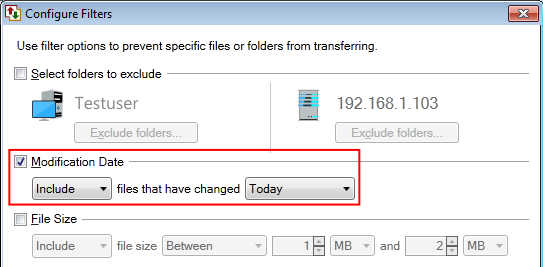
Right click on the profile name and start the automated transfer. You will notice that, only files which are modified today are downloaded.
Hello! It looks like you're interested in this conversation, but you're not signed in.
Sign in with your Deskshare account to ask a question, reply, and get an email when someone answers. You will come back to exactly where you left off.
With your input, this post could be even better 💗
Register Login