Saving the Security Monitor Pro log files once a week
-
I have Security Monitor Pro configured on my PC with 4 IP cameras. I find that log files are saved every day. I would like the log files to be saved every Monday. Please assist.
-
The default setting in Security Monitor Pro is to save the event log every day. You can change it from the event log settings.
To configure the event log settings, click on the Settings icon on the tool bar. On the Event Logging tab, select Monday from the drop down list under the ‘Save and Delete Event Log:’ section. Select the time when you want to save the event log file. The time should be entered in 24 hour format. Click Ok and save your changes.
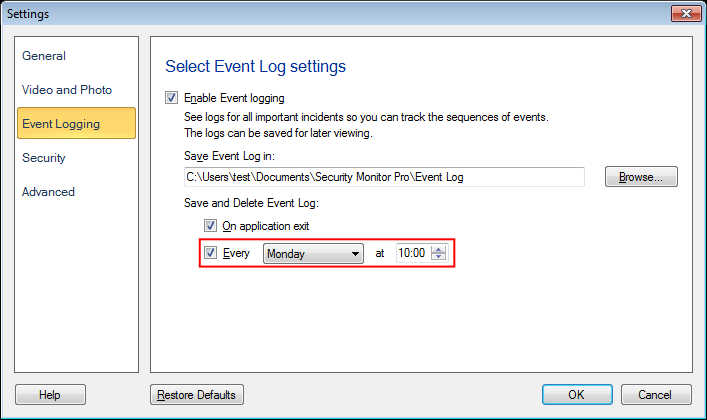
The event log file will now be saved every Monday at your selected time.
Hello! It looks like you're interested in this conversation, but you're not signed in.
Sign in with your Deskshare account to ask a question, reply, and get an email when someone answers. You will come back to exactly where you left off.
With your input, this post could be even better 💗
Register Login