Start broadcasting on application launch
-
I use WebCam Monitor to broadcast my USB camera stream. I have a question - can WebCam Monitor start broadcasting when I launch it?
-
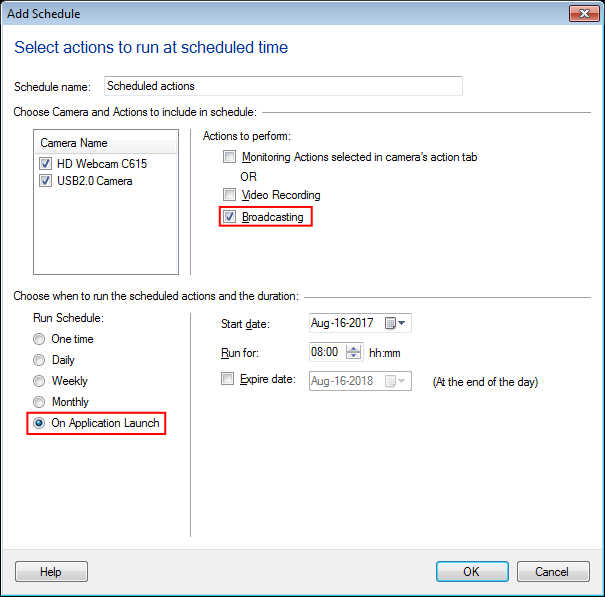
You can automatically start broadcasting a live video stream over the network with WebCam Monitor. There are 2 ways to start broadcasting on application launch. The first is to add a schedule to start the broadcasting action on application launch. Another way is to configure WebCam Monitor to start previously running actions on launch.
To add a schedule, click on the Scheduler icon from the tool bar. Select the broadcasting action and On the Application Launch Schedule type. Click Ok to save the scheduler settings.
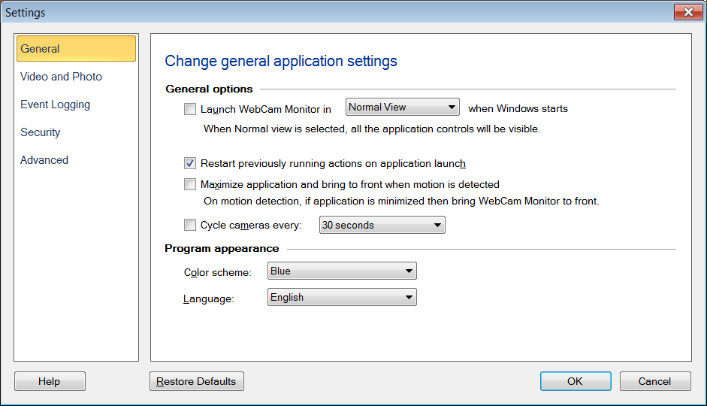
The second method is to configure the settings to restart previously running actions. To do this, click the Settings icon on the toolbar. On the ‘General’ settings tab, select Restart previously running actions on application launch. Click Ok to save your settings. Right click on the camera preview and start the broadcasting action. Close the application. The next time you launch the application, then broadcasting action will start automatically.
Hello! It looks like you're interested in this conversation, but you're not signed in.
Sign in with your Deskshare account to ask a question, reply, and get an email when someone answers. You will come back to exactly where you left off.
With your input, this post could be even better 💗
Register Login