Read medical instructions out loud daily with Text Speaker
-
I want to use Text Speaker to repeat a set of instructions out loud each day. This is for an elderly lady so she remembers to take her medicine and to change her bandages. Can you tell me how I can read these instructions out loud daily with Text Speaker?
-
Text Speaker can narrate instructions on a schedule using the Talking Reminders feature.
To configure the settings for a reminder, click on the Talking Reminders icon on the toolbar. Click on the Create button to configure a schedule for reading instructions. On the Reminder details dialog, specify a start date and time. Select the Repeat Every option and set it to ‘Repeat Every 1 day’. Enter the instructions in the text area that you want Text speaker to read. Click Ok to save your settings.
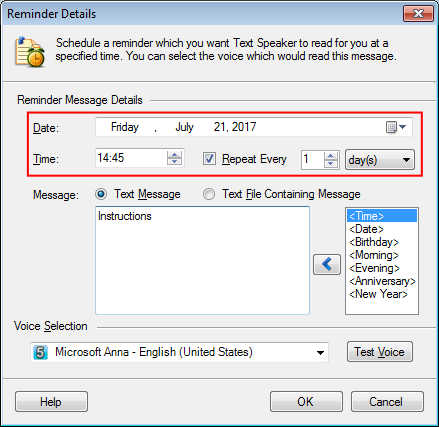
Now, Text Speaker will narrate instructions every day at a specified time. You can add multiple reminders to read different instructions.
Hello! It looks like you're interested in this conversation, but you're not signed in.
Sign in with your Deskshare account to ask a question, reply, and get an email when someone answers. You will come back to exactly where you left off.
With your input, this post could be even better 💗
Register Login