Watching my webcam preview on a PC in another room
-
I have added my USB camera in WebCam Monitor and it works well. I have one question - Can I watch the webcam preview from a PC in another room?
-
With WebCam Monitor you can watch the webcam preview on multiple PCs using the broadcasting feature. This feature allows you to broadcast the camera stream from your webcam and view it on other PCs.
To configure settings for broadcasting the camera stream, right click on the camera preview and select the Start broadcasting option. When broadcasting starts, you will see a ‘Broadcasting URL’ in the event log viewer. Go to your other PC, and open the Broadcasting URL in VLC or Windows Media Player to view the camera stream.
You can adjust the broadcast IP address and Port number from Edit Camera >> Broadcast tab.
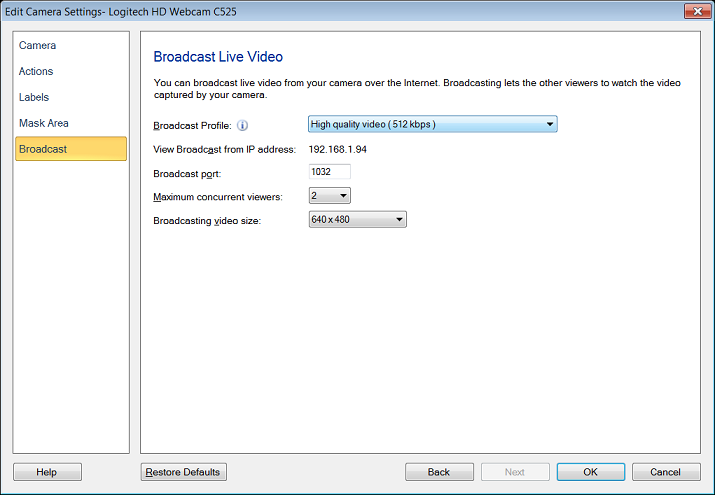
Note: You will need to enter the correct broadcast url in the media player to view the live stream. Make sure your PC has a active network connection for this to work.
Hello! It looks like you're interested in this conversation, but you're not signed in.
Sign in with your Deskshare account to ask a question, reply, and get an email when someone answers. You will come back to exactly where you left off.
With your input, this post could be even better 💗
Register Login