Creating audio files with background music in Text Speaker
-
I am using your software to convert a short story I wrote to audio. Is it possible to add background music along with the voice speaking out the story?
-
You can add background music to the audio created from your story with Text Speaker.
To add background music, open your document in Text Speaker. Click on the Convert to Audio icon from the toolbar. Look for the 'Background Music' section and select the Add background music to output file option. Click the Browse button and select the music file that you want to add. You can test how it sounds using the Test button. Click OK to start conversion.
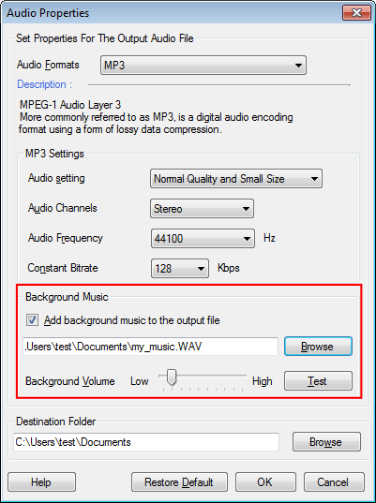
The file formats supported for background music are MP3, WAV, AVI, WMA, MPA, ASF, MPEG, MPG, and M1V.
Note: You can add background music only during conversion of your document to MP3 format.
Hello! It looks like you're interested in this conversation, but you're not signed in.
Sign in with your Deskshare account to ask a question, reply, and get an email when someone answers. You will come back to exactly where you left off.
With your input, this post could be even better 💗
Register Login