Copy settings to another IP camera without manually configuring it again
-
Is it possible to configure actions for one IP camera and copy the same actions to my other cameras? I have 6 cameras and it would make things easier if I can just copy my action settings.
-
Security Monitor Pro has a Copy action settings feature that will do exactly what you are looking for.
Follow these steps to copy your settings:
Right click on the first camera preview and select the Edit Camera option. On the Actions tab, configure the actions you want and save the changes.For the second camera, open the Actions tab and look for Copy action settings from option. Select the first camera name from the drop down list. Click the Copy button and then select Yes to confirm the copy settings action. All actions configured for the first camera will be copied to the second camera. Repeat these steps for all the remaining cameras.
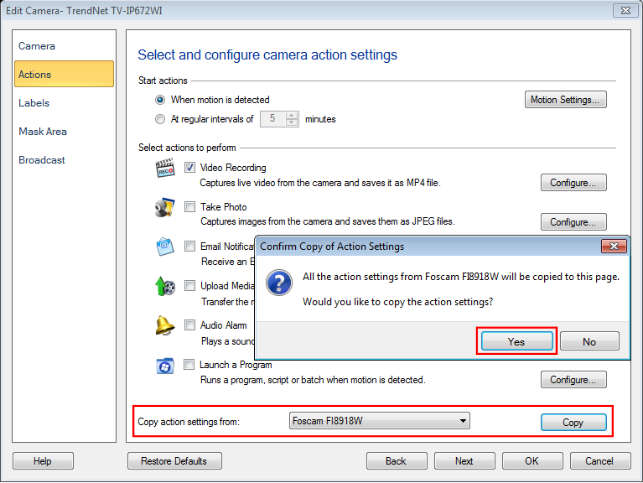
Use this feature to copy the actions for multiple cameras.
Note: Copy action settings option will appear only when you have at least one camera added in the application.
Hello! It looks like you're interested in this conversation, but you're not signed in.
Sign in with your Deskshare account to ask a question, reply, and get an email when someone answers. You will come back to exactly where you left off.
With your input, this post could be even better 💗
Register Login