Setting wait interval between email notifications
-
I am using Security Monitor Pro to perform video recording and email notification action on motion detection. Sometimes too many emails are sent when a motion trigger occurs. Can I set a wait interval between emails to control the number of emails sent?
-
Security Monitor Pro allows you to set wait interval between email notifications. This will limit the number of emails received whenever there is continuous motion.
To configure notification settings, click on the Manage Camera icon from the tool bar. Select the camera and click on the Edit camera button. Now on Actions tab, go to Select actions to perform section and click Configure button of Email Notification action.
On Email Notification Settings, look for Customize Email section and select the required wait interval from the dropdown list. The highest wait interval you can set is 30 minutes.
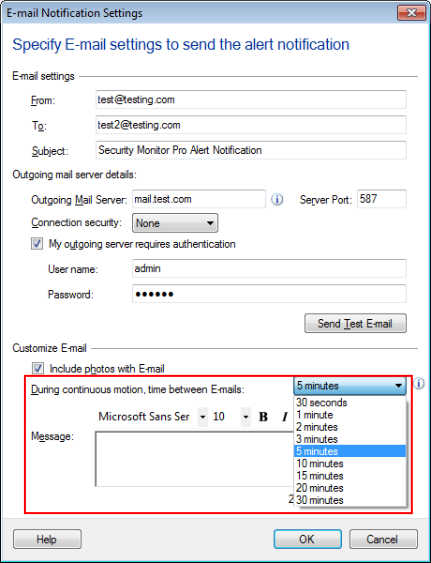
After motions detection an Email will be sent. Then application will wait for N minutes and will send the Email if motion is detected after the N minutes.
Hello! It looks like you're interested in this conversation, but you're not signed in.
Sign in with your Deskshare account to ask a question, reply, and get an email when someone answers. You will come back to exactly where you left off.
With your input, this post could be even better 💗
Register Login