Deleting files from my PC after FTP upload
-
I am looking for an FTP client application to transfer files from my PC to the FTP server and remove the files from my PC after completing the transfer. Can your software do this?
-
Auto FTP Manager can move or delete the files from the source after the transfer completes.
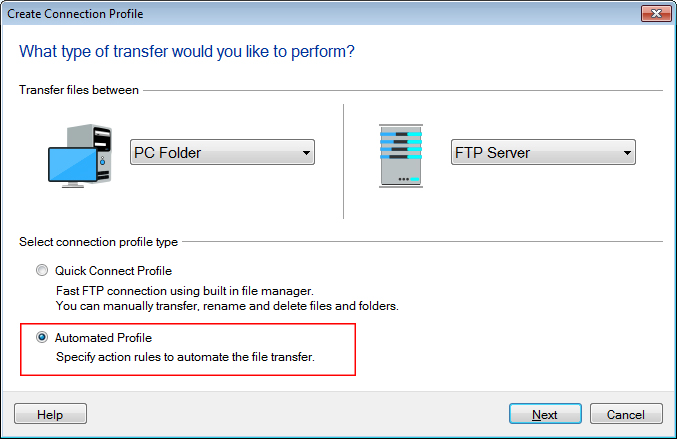
First, create an Automated Transfer Profile. In Auto FTP Manager go to the File menu and select ‘New Connection Profile’ option. Choose ‘Automated Profile’ and click on the next button.
Enter the connection information, URL, username, password and port number, etc. On the next page you can set the action rules for the automated transfer. Tick the ‘After Transfer’ check box and select the ‘Move’ or ‘Delete’ option from the drop down as required. If you want to move files to another location, then specify the folder path using the ‘Location’ button. Click on the Next button to enter the profile name and finish the settings.
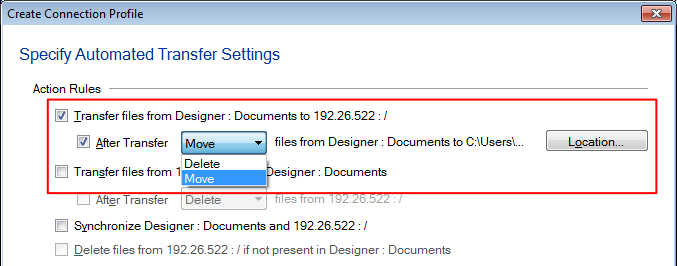
Whenever you run the automated transfer, the files will be uploaded to the server and removed from your PC folder.
Hello! It looks like you're interested in this conversation, but you're not signed in.
Sign in with your Deskshare account to ask a question, reply, and get an email when someone answers. You will come back to exactly where you left off.
With your input, this post could be even better 💗
Register Login