Software to boost your productivity Deskshare
Download
Support Forum

Ask questions and find solutions to common problems.


Technical Support

Your complete reference to product technical support.


Lost License Key

Retrieve your purchase history using our automated system.

Articles

Read expert insights on how to get the most out of our software.


Video Tutorials and Manuals

Learn new features and functions with our easy to follow videos and guides.

Contact Us

Your direct line to chat with us.


About Deskshare

Discover our story and values

My Account Log In
Log In
    Deskshare Support Forum
    • Recent
    • Popular
    • Login

    Recording an application window moved across the screen

    Scheduled Pinned Locked Moved My Screen Recorder
    2 Posts 2 Posters 2.5k Views
    Loading More Posts
    • Oldest to Newest
    • Newest to Oldest
    • Most Votes
    Reply
    • Reply as topic
    Log in to reply
    This topic has been deleted. Only users with topic management privileges can see it.
    • C
      Chuyin_fomseca
      last edited by

      I would like to record an application and move the applications window to the other side of the PC screen. Can the recorded region be moved in My Screen Recorder?

      1 Reply Last reply
      Reply Quote
      • D
        DeskShare_-_Support
        last edited by

        My Screen Recorder can record the full screen or a region. You have to perform the region recording, and use the mouse to move the selected region anywhere on the screen.

        Click on the 'Record' icon on the toolbar and select the ‘Custom Region’ option from the drop-down list. When you click on the Ok button, the mouse pointer will change to a crosshair. Select the window to record by dragging the crosshair over the region.
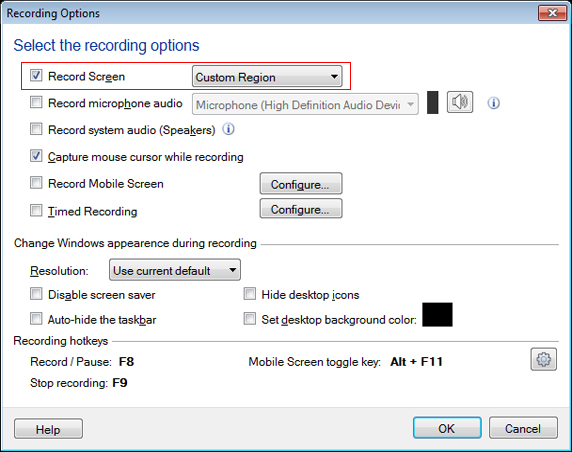
        As you record, a flashing green border shows the area that is being captured. If you need to move the application window, pause your recording, use the mouse to move the recorded region and the application window to a different part of the screen. You can restart the recording when both are in position.

        1 Reply Last reply
        Reply Quote

        Hello! It looks like you're interested in this conversation, but you're not signed in.

        Sign in with your Deskshare account to ask a question, reply, and get an email when someone answers. You will come back to exactly where you left off.

        With your input, this post could be even better 💗

        Register Login
        • 1 / 1
        • First post
          Last post