Automatically transfer files once a week
-
I want to transfer files automatically on every Thursday. How can I do this in Auto FTP Manager?
-
Auto FTP manager allows you to automatically transfer files at specified date and time using Schedule Transfers.
You have to create Automated profile for transferring files from FTP server and then create schedule for that profile.
To create automated transfer profile, click File >> New Connection Profile. Select connection profile type as Automated Profile.
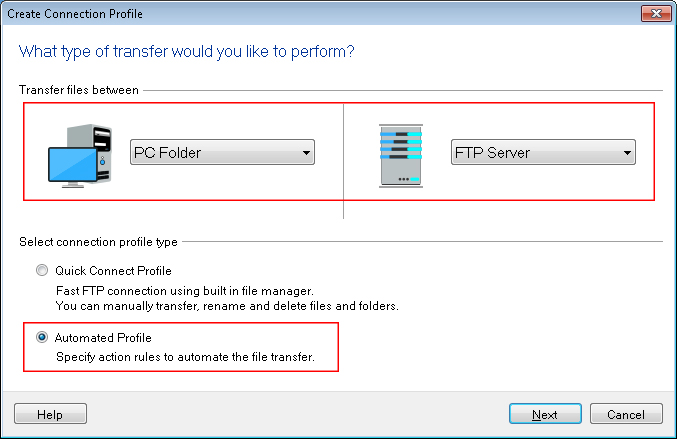
Enter FTP details such as FTP address, port number, username and password. Navigate to next page, look for Action rules section and select the transfer actions.
Under Schedule Transfers section, click on Configure button. Select Perform Automated transfer option and schedule type as Weekly. Specify Start date and time and select Thursday as the day of the week for transferring files.
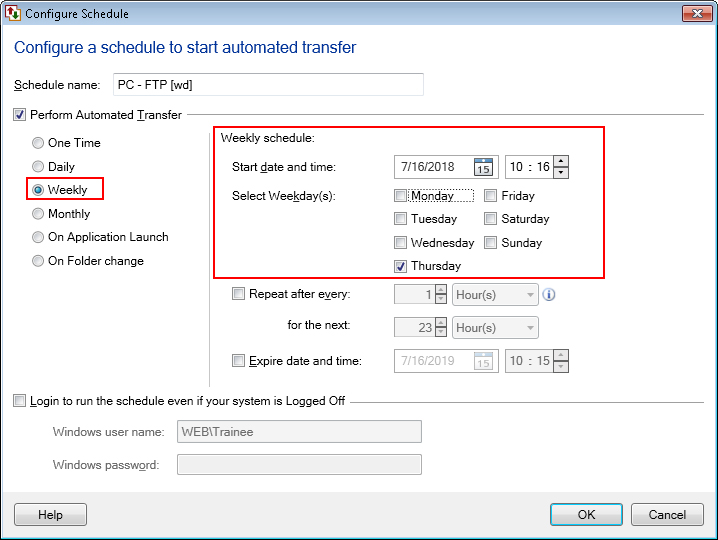
The schedule will run every week on Thursday at specified time and files will be transferred to destination automatically.
Hello! It looks like you're interested in this conversation, but you're not signed in.
Sign in with your Deskshare account to ask a question, reply, and get an email when someone answers. You will come back to exactly where you left off.
With your input, this post could be even better 💗
Register Login