Adding a logo on the IP camera preview
-
I have 16 IP cameras running in Security Monitor Pro. I want to have our company logo on the camera preview. Please explain how.
-
In Security Monitor Pro you can easily add a watermark image to the camera preview. Adding a watermark is same as adding a logo to the camera preview.
Right click on the camera preview and select Edit Camera option. On labels tab, select Include Watermark checkbox and add the logo image file. You can also adjust the image transparency level and rotate the image label.
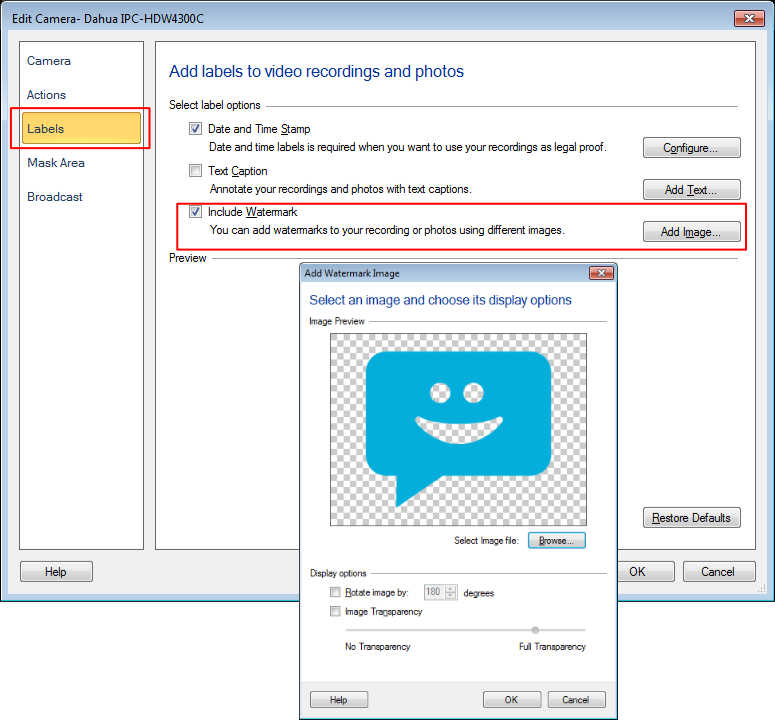
Note that below 60% transparency, motion will not be detected behind the image watermark.
Hello! It looks like you're interested in this conversation, but you're not signed in.
Sign in with your Deskshare account to ask a question, reply, and get an email when someone answers. You will come back to exactly where you left off.
With your input, this post could be even better 💗
Register Login