Keeping Security Monitor Pro running in the background
-
Is it possible to keep Security Monitor Pro running in the background? I would like to hide it so it is not visible on the screen.
-
You can hide the Security Monitor Pro from the PC screen and keep it running in background.
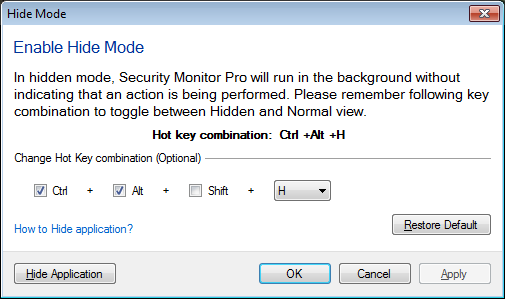
To hide the application, go to the File menu and select the ‘Enable Hide Mode’ option.
Set the hot key combination to hide and unhide the application from the PC screen. Remember this key combination and use it to switch between hidden and normal mode.
In hidden mode, Security Monitor Pro will not appear in the taskbar or notification tray area. It will continue running in background performing the configured actions like monitoring, broadcasting or recording.
Hello! It looks like you're interested in this conversation, but you're not signed in.
Sign in with your Deskshare account to ask a question, reply, and get an email when someone answers. You will come back to exactly where you left off.
With your input, this post could be even better 💗
Register Login