Making a mp3 audio book containing multiple voices
-
I have to create a mp3 audio book for kids. I would like each character in the story to have their own voice. Can I mix voices in a single mp3?
-
Text Speaker gives you the ability to use multiple voices in a single audio. So, yes, each character can have their own voice!
If there are many different characters in your book, it will help to make a list with two columns - the left will be the character name and on the right will be the voice name. We will be using voice tags before each character speaks.
Open your book file with Text Speaker. To use a specific voice, select the text in the document and from the Edit menu click on the ‘Insert Voice Change’ option. Once you complete inserting the voices for each character, you can start the conversion to MP3 audio format.
If you need additional voices, you can download them here:
https://www.deskshare.com/text-to-speech-voices.aspx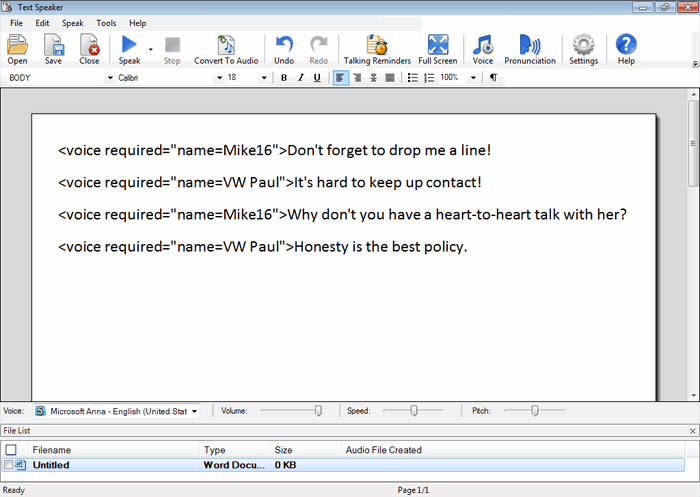
Hello! It looks like you're interested in this conversation, but you're not signed in.
Sign in with your Deskshare account to ask a question, reply, and get an email when someone answers. You will come back to exactly where you left off.
With your input, this post could be even better 💗
Register Login