Notifying multiple people when motion is detected
-
Does Security Monitor Pro allow sending email notifications to multiple people when a motion detection alert is triggered?
-
Security Monitor Pro immediately sends out email notifications on motion detection. You can select multiple email address to receive this notification.
To configure these settings, open 'Manage Cameras' from the tool bar. Select the camera and click 'Edit Camera'. On Actions Tab, look for 'Email notification' and click the 'Configure' button.
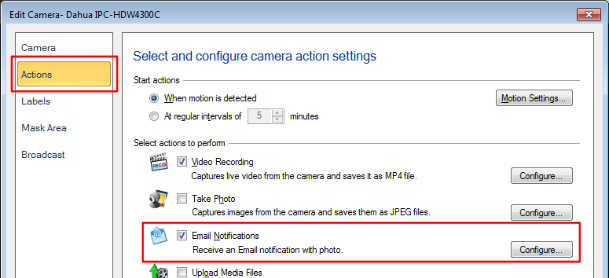
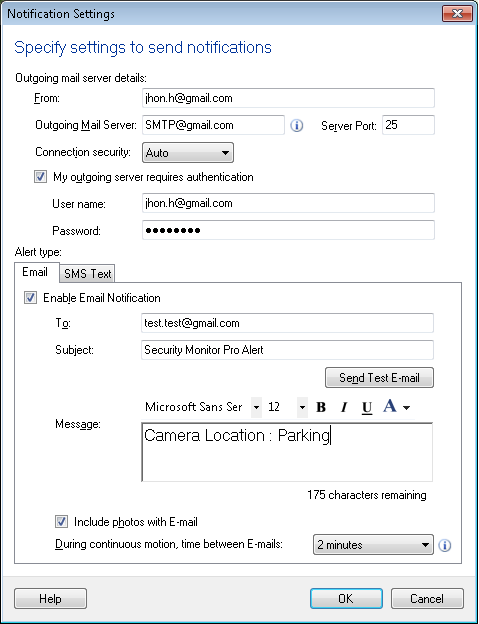
In the To field add all the email addresses separated by a comma (","). To make sure everyone on the list receives the email, click on the 'Send Test Email' button.
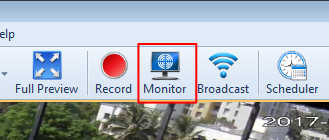
After configuring email notification, start monitoring for motion by selecting 'Monitor' option on tool bar. Email notifications will be sent to all the listed email addresses whenever an alert is triggered.
Hello! It looks like you're interested in this conversation, but you're not signed in.
Sign in with your Deskshare account to ask a question, reply, and get an email when someone answers. You will come back to exactly where you left off.
With your input, this post could be even better 💗
Register Login