Read only a portion of text from a long document
-
I am new to Text Speaker and just playing with the trial version. I want it to read only a portion of text from a very large document. Please explain how I can do this.
-
Yes, you can do this in Text Speaker. Open your document, select the text, go to the Speak menu or right click and select ‘Speak Highlighted Text’.
If you have many paragraphs in different parts of the document, then select the text, right click and choose the ‘Outline Area’ option for each paragraph.
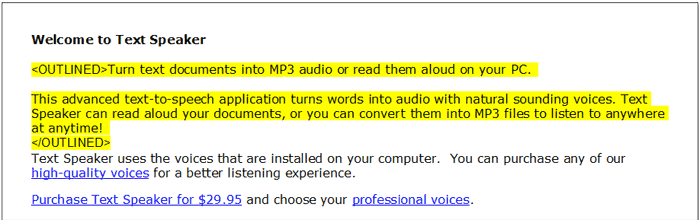
Do this for all the text you want to read. Finally go to the ‘Speak’ menu and select the ‘Speak Outlined Text’ option.
Hello! It looks like you're interested in this conversation, but you're not signed in.
Sign in with your Deskshare account to ask a question, reply, and get an email when someone answers. You will come back to exactly where you left off.
With your input, this post could be even better 💗
Register Login