Only motion activated recordings for 6 hours daily
-
I want to do recording only when there is motion and that too only for six hours daily. I appreciate some help.
-
Security Monitor Pro triggers an event when motion is detected on the camera and can easily be scheduled to monitor for specific duration.
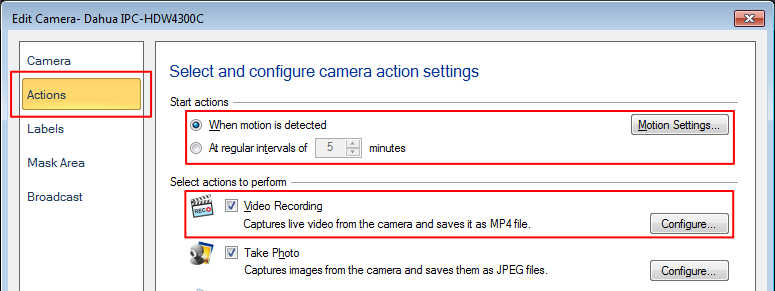
To record video on motion detection, click on Manage cameras from Tool bar, choose the camera and click Edit Camera. On Actions tab, select ‘When motion is detected’ as the primary action and check 'Video Recording' under actions to perform section. You can also adjust the motion trigger level by clicking on the ‘Motion Settings’ button.
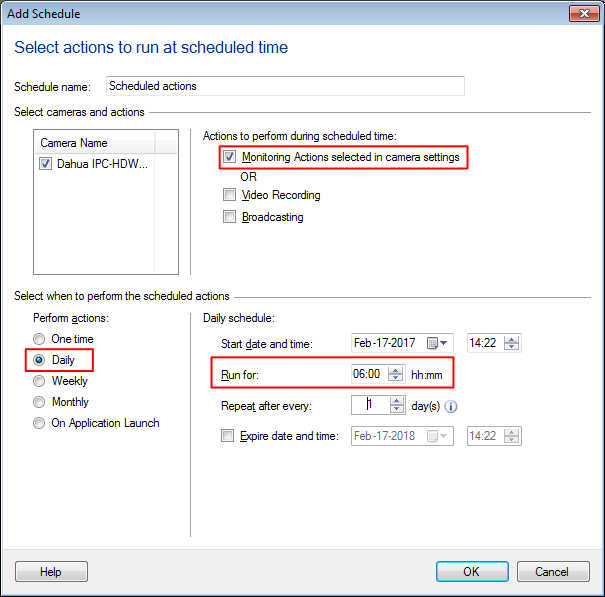
Now to create a schedule, click on the ‘Scheduler’ button on the tool bar. Choose the camera and select Daily schedule to run for 6 hours. Select Monitoring as the actions to perform during scheduled time. This will monitor for motion on your selected camera daily for the 6 hour time frame.
When motion is detected, the video recording will start and will continue recording as long as motion is present.
Hello! It looks like you're interested in this conversation, but you're not signed in.
Sign in with your Deskshare account to ask a question, reply, and get an email when someone answers. You will come back to exactly where you left off.
With your input, this post could be even better 💗
Register Login