Running a FTP transfer every 2 minutes
-
I want to check for new files on a FTP server every two minutes, and download new files automatically. Can I do this using Auto FTP Manger?
-
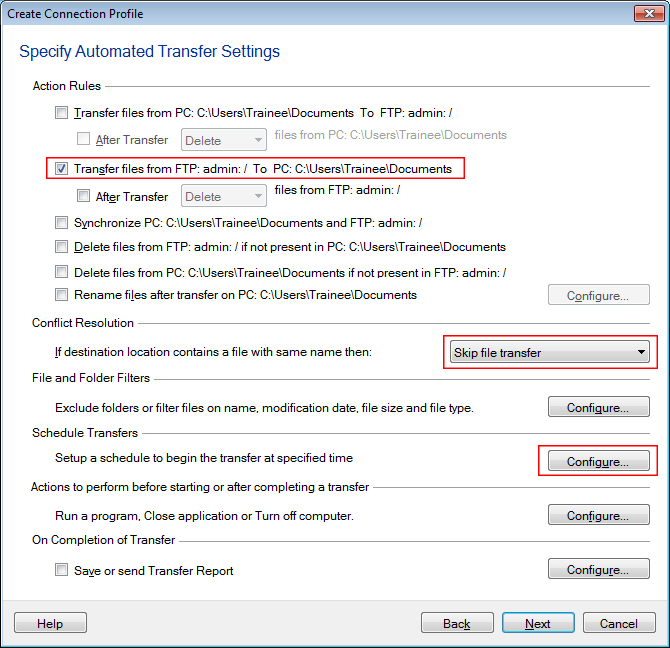
Yes, Auto FTP Manager can skip the file transfer if the destination already contains a file with same name. To configure this, select the 'Skip file transfer' option in the Conflict resolution drop down list. This will download only new files. Next, you can use the 'Configure' button to add a schedule to automate the process.
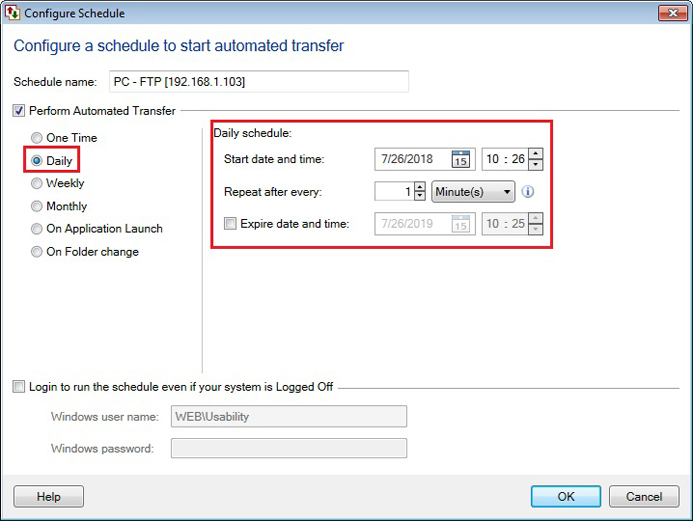
Choose a daily schedule type, enter the start date-time and set the repeat interval to 2 minutes.
The schedule will run every two minutes and only new files will be downloaded.
Hello! It looks like you're interested in this conversation, but you're not signed in.
Sign in with your Deskshare account to ask a question, reply, and get an email when someone answers. You will come back to exactly where you left off.
With your input, this post could be even better 💗
Register Login