Configuring webcam audio settings in WebCam Monitor
-
I want to record video along with audio from my webcam. My webcam is older and does not have a microphone. Can I use some other microphone for audio? How do I configure it to record audio in WebCam Monitor?
-
You can record audio from a secondary device like a microphone from WebCam Monitor. Just add your webcam in WebCam Monitor and also connect the microphone to your PC. Go to Edit camera and select the microphone which you have attached from the audio device drop down.
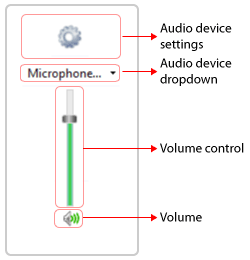
Now, you can record video along with audio for your webcam.
Hello! It looks like you're interested in this conversation, but you're not signed in.
Sign in with your Deskshare account to ask a question, reply, and get an email when someone answers. You will come back to exactly where you left off.
With your input, this post could be even better 💗
Register Login