Reducing the file size on e-book to mp3 text to speech conversion
-
I am using Text Speaker to convert an E-book into a MP3 file. The output MP3 file size is too large. How can I reduce the MP3 file size?
-
You can reduce the MP3 audio file size in Text Speaker by selecting the proper values for Audio Frequency, Bitrate and Audio quality from the Audio Properties dialog.
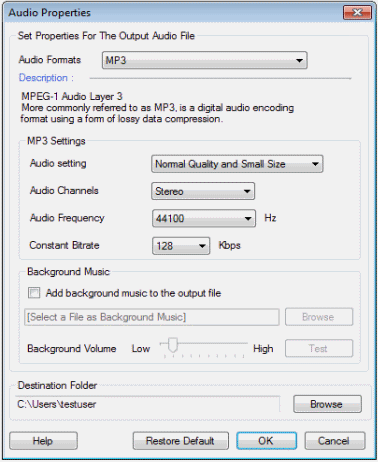
If you have selected high values for quality, bitrate and frequency, then the output MP3 file will be large. Try choosing a lower bitrate. Please note that the size of the MP3 file will also depend on the size of E-book which you are converting.
Hello! It looks like you're interested in this conversation, but you're not signed in.
Sign in with your Deskshare account to ask a question, reply, and get an email when someone answers. You will come back to exactly where you left off.
With your input, this post could be even better 💗
Register Login