Reading e-mails using Text Speaker
-
I am using the evaluation version of Text Speaker. Can you tell me how to use it to read my emails?
-
You can read the email content in Outlook, Gmail or any mail reader using the keyboard shortcuts in Text Speaker. Go to ‘Settings’ and then select ‘Keyboard HotKeys’ tab. Choose the key combination to start speaking, stop speaking, pause/resume speaking as shown below.
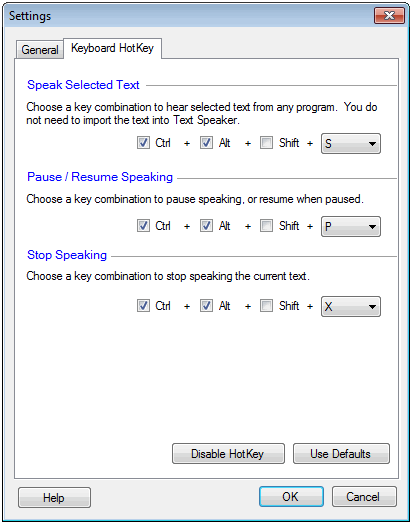
Next, select the content from your Email and use the keyboard shortcuts to listen. You don’t have to copy the content of email to Text Speaker, anything on your screen can be read aloud.
Hello! It looks like you're interested in this conversation, but you're not signed in.
Sign in with your Deskshare account to ask a question, reply, and get an email when someone answers. You will come back to exactly where you left off.
With your input, this post could be even better 💗
Register Login