Reviewing which files got downloaded in the last scheduled transfer
-
I added a schedule for downloading an entire directory with a lot of subfolders. Is there some way I can find out which files got downloaded in the last scheduled run?
Thank you in advance for your help. -
In Auto FTP Manager, transfer reports are generated after each automated transfer. You can select a location to save the reports.
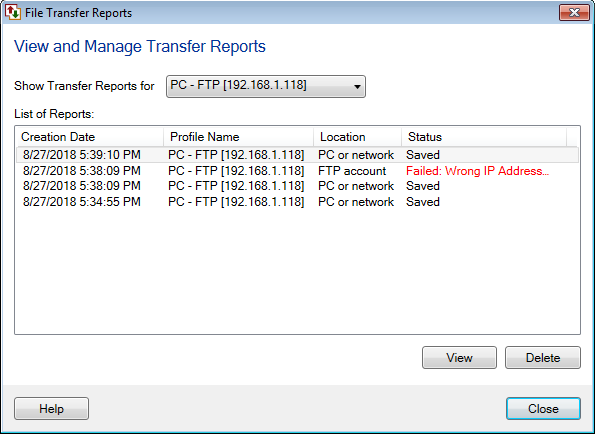
To open the Auto FTP Manager transfer reports, go to File >> Open Transfer Reports. On ‘File Transfer Reports’ dialog, select the profile from ‘Show Transfer Reports for’ dropdown and click 'View' button to see the status of the transfer.
[img=https://www.deskshare.com/forums/images/posts/AFMpost4957.png]Configure File Transfer Report[/img]
The generated transfer report will show you the list of files that got downloaded in the last scheduled run. You can also see detailed information on successful and failed transfers.
Hello! It looks like you're interested in this conversation, but you're not signed in.
Sign in with your Deskshare account to ask a question, reply, and get an email when someone answers. You will come back to exactly where you left off.
With your input, this post could be even better 💗
Register Login