Hiding Text Speaker from the task bar while reading text files
-
I am using the keyboard hot key to read text in my browser. How can I hide Text Speaker from the task bar while reading text?
-
You can hide Text Speaker from the task bar while reading text.
Follow these steps:
Click Tools >> Settings, select 'On close minimize Text Speaker to system tray' option under General Preferences section.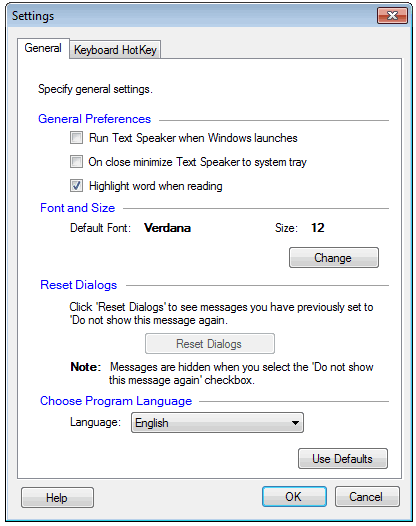
When you close the application window, it will be minimized to system tray and will be hidden from task bar. Now, you can use the keyboard short cuts to read your text.
Hello! It looks like you're interested in this conversation, but you're not signed in.
Sign in with your Deskshare account to ask a question, reply, and get an email when someone answers. You will come back to exactly where you left off.
With your input, this post could be even better 💗
Register Login