Reading text out loud while using any application
-
I have just started using Text Speaker. I am copying text and from my browser and pasting it into your software in order to read it. Is there any way to read the document without copying the text over?
-
Yes, you can read a document without copying or importing it into Text Speaker. You just need to select the text in the file and press the hotkey to listen to it.
For each hotkey, choose a combination of modifier keys (shift, alt, and ctrl) with any alphabet or function key. Keyboard hotkeys are available to start, pause, resume, and stop the speech.
You can set the Hotkeys from Tools >> Settings >> Keyboard Hotkey.
Here is an example: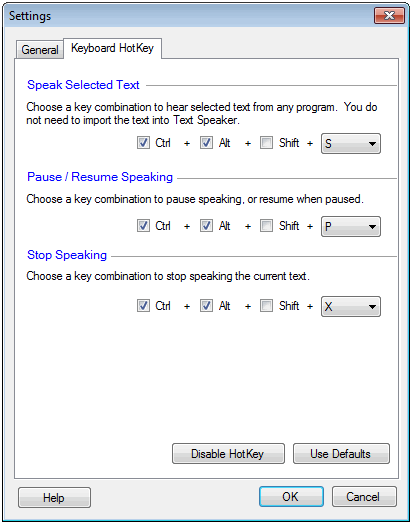
Hello! It looks like you're interested in this conversation, but you're not signed in.
Sign in with your Deskshare account to ask a question, reply, and get an email when someone answers. You will come back to exactly where you left off.
With your input, this post could be even better 💗
Register Login