Uploading webcam images to weather site only during daytime hours
-
Hello, I am using your product to automatically ftp images from my webcam to a weather site. The camera takes an image at some regular intervals 24/7. The problem is, I don't want to upload the images taken in darkness.
-
You can do this in WebCam Monitor by adding a daily schedule. Using the schedule you can choose to upload photos taken during the daytime hours only.
Click on the 'Scheduler' icon on the tool bar, you will see the following dialog.
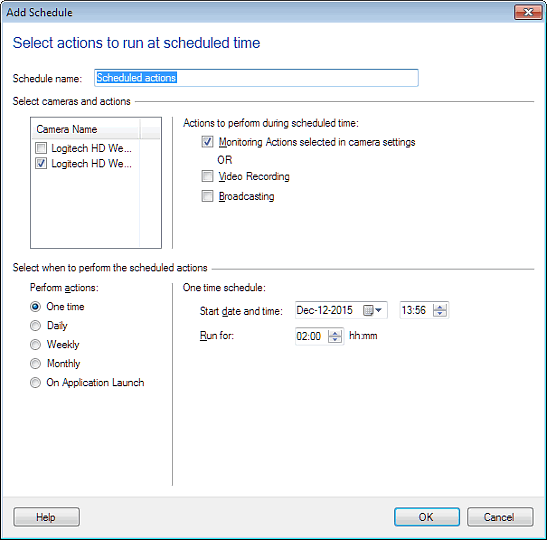
By default 'Monitoring Actions selected in camera settings' option is selected. Now select 'Daily' schedule, enter start date and time, number of hours to run the schedule. Here you can select the day time by specifying 'Start date and time:- Jan-08-2016 06:30' and 'Run for:- 13:00'.
When the schedule runs, the photos will be uploaded only for the time frame you have specified.
Hello! It looks like you're interested in this conversation, but you're not signed in.
Sign in with your Deskshare account to ask a question, reply, and get an email when someone answers. You will come back to exactly where you left off.
With your input, this post could be even better 💗
Register Login