Creating a .wav file using AT&T voices
-
I have a small amount of written text that I want to change into an audio file for a talking picture frame. The picture frame requires a wave file. I really like one of the AT&T voices you have. Can you tell me if I can create a wave file with the AT&T voice?
-
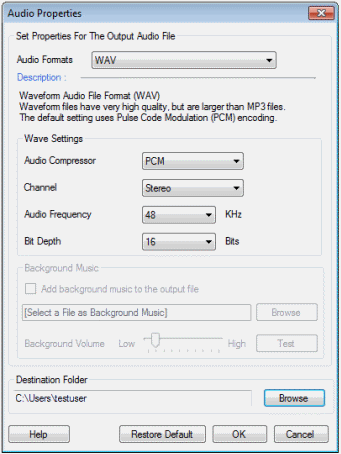
Text Speaker can easily create your .wav file. Just open the application, enter the text which you want to convert and save your text file. Go to the 'Speak' menu and select 'Convert Current File To Audio'. Select 'WAV' from 'Audio formats' drop down. Select the destination folder using 'Browse' button. Finally, click OK to convert your text file into a .wav file.
There are many different voices that will work with Text Speaker. Here is a list of voices you can use:
https://www.deskshare.com/text-to-speech-voices.aspx
Hello! It looks like you're interested in this conversation, but you're not signed in.
Sign in with your Deskshare account to ask a question, reply, and get an email when someone answers. You will come back to exactly where you left off.
With your input, this post could be even better 💗
Register Login