File getting overwritten while downloading from server on schedule
-
Hi. I'm very new to the product. I have created a schedule for downloading a file from my server. I want to download the file to a destination folder, but I also want to have older versions of the file remain in the folder.
Any thoughts on this? -
You can have all the versions of your file preserved in the destination, you just need to rename your files while downloading. Auto FTP Manager makes this easy using conflict resolutions.
If you have already created an automated transfer profile then select your profile from the 'Profile List' and click on the 'Edit Profile' icon on the toolbar.
Next, go to the 'Specify Automated Transfer Settings' page.
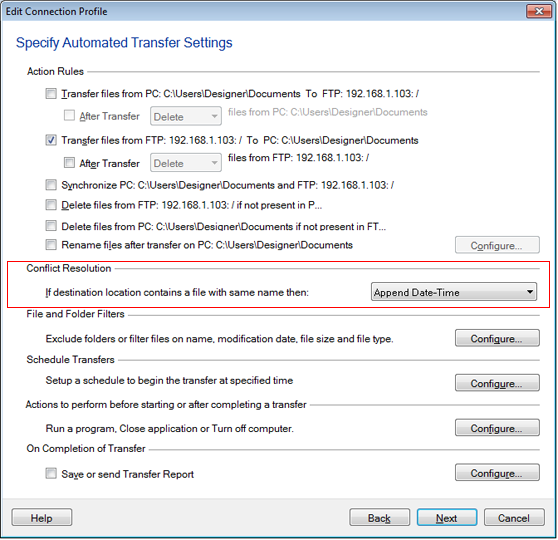
Under the 'Conflict Resolution' section, change the 'Overwrite Always' option to 'Append date and time' in the dropdown control.
When the schedule launches, the file will be downloaded and it will be renamed with the current date and time. So you can keep all the versions of your file in the destination folder.
Hello! It looks like you're interested in this conversation, but you're not signed in.
Sign in with your Deskshare account to ask a question, reply, and get an email when someone answers. You will come back to exactly where you left off.
With your input, this post could be even better 💗
Register Login