How do I translate text from images?
-
I have photocopies of documents but I don't have a digital version. I want to translate my German language documents to English. Can your application help me do this quickly?
-
Document Translator allows you to extract text from images and translate them.
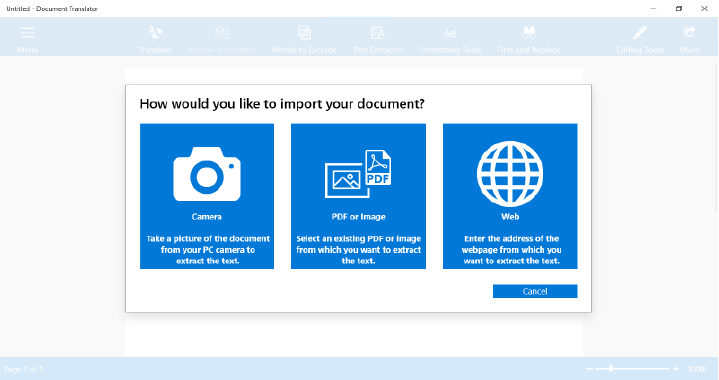
To get the text from images, click the ‘Text Extractor’ icon on the toolbar. You will see a screen with options to extract text from PDF, image or Web. If you have images of documents in your PC then select the option to extract text from the image.
[img=https://www.deskshare.com/forums/images/posts/DTPost3745-1.png]Extract Text from Image and translate[/img]
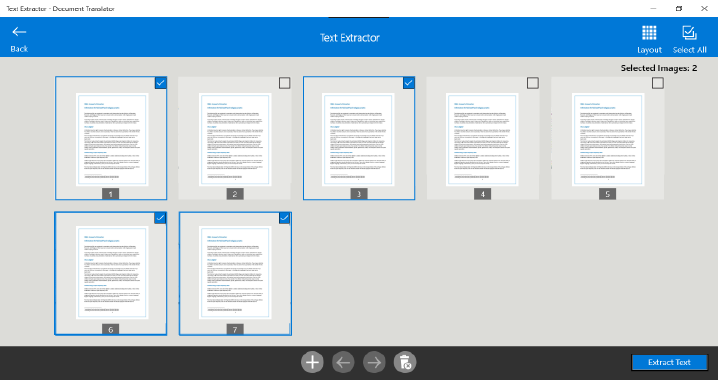
Select the scanned images and click the ‘Extract Text’ button. You will get the text from all images into an editable format.
[img=https://www.deskshare.com/forums/images/posts/DTPost3745-2.png]Translate text in Image[/img]
Next, click the **Translate **icon and select the language for translation to ‘English’. Then click the ‘Translate’ button. Once the translation process completes, you will see the documents in English language. This way you can translate all your German documents to English.
Hello! It looks like you're interested in this conversation, but you're not signed in.
Sign in with your Deskshare account to ask a question, reply, and get an email when someone answers. You will come back to exactly where you left off.
With your input, this post could be even better 💗
Register Login