Which connection type to select in Screen Cast?
-
I have just downloaded Screen cast and I am not sure which connection type I should select. Can you please explain what the differences are?
-
Using Screen Cast you can view your mobile screen on any device with a browser.
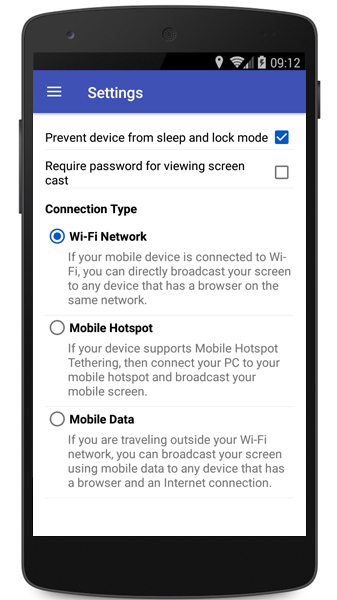
If you have Wi-Fi turned on and you are in the same network as your PC then select the connection type as ‘Wi-Fi network’.
If you don't have a Wi-Fi connection, select mobile hotspot and you can connect your PC to the mobile hotspot Screen Cast creates.
If your mobile device and PC are far apart then you can use ‘Mobile Data’. This selection will use your mobile network. You can use the browser on your PC to connect to the URL displayed on your mobile screen.
To select the connection type, go to Settings in Screen Cast and choose the Connection Type as 'Wi-Fi Network', 'Mobile Hotspot' or ‘Mobile Data’.
[img=https://www.deskshare.com/forums/images/posts/SCpost6224.jpg]Connection Settings in Screen Cast[/img]
You can easily switch between connection types depending on the network of your mobile device and PC.
Hello! It looks like you're interested in this conversation, but you're not signed in.
Sign in with your Deskshare account to ask a question, reply, and get an email when someone answers. You will come back to exactly where you left off.
With your input, this post could be even better 💗
Register Login