Generating transfer reports only when a file transfer failed
-
I am using Auto FTP Manager to transfer files from my PC to FTP server. I receive transfer reports for all events, but I want to save the transfer report only if there is a transfer failure. Is it possible using Auto FTP Manager? If yes, please tell me how.
-
Auto FTP Manager allows you to save transfer report when a failure occurs. You can choose to generate the transfer report on specific events.
To configure settings of the transfer report for your automated transfer profile, go to Profiles >> Edit Profile. On the ‘Specify Automated Transfer Settings’ page, select the Save or send transfer report option under the ‘On completion of transfer’ section and click the **Configure **button.
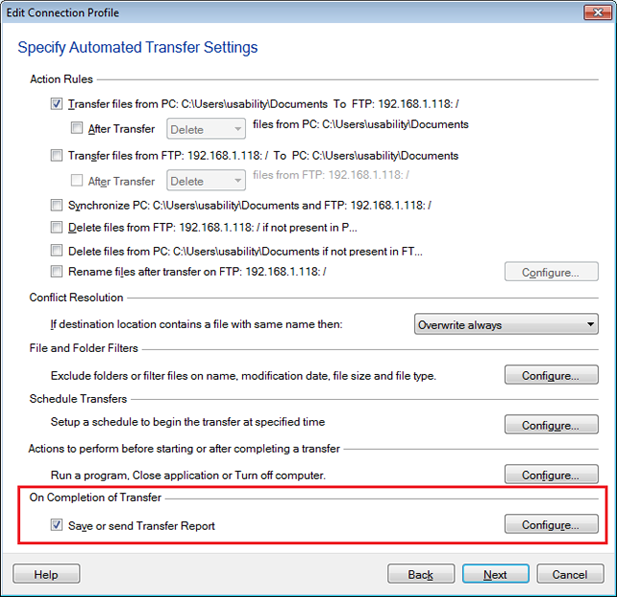
Then on ‘Transfer report settings’ dialog, select ‘When an automated transfer is completed’ option and choose ‘Save reports when there are file transfer failures’ option. Then you can choose the location to save transfer report, click Ok and finish the settings.
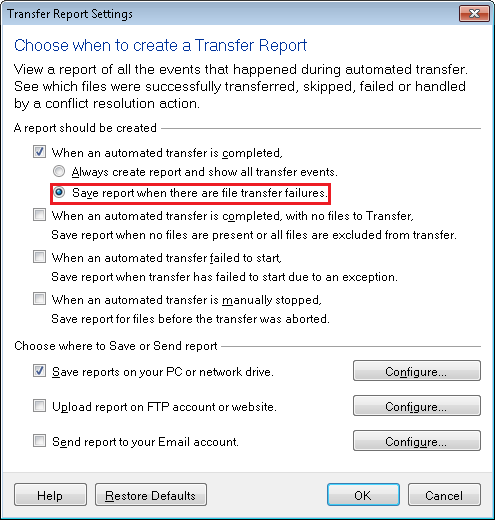
Now, whenever an automated transfer is completed, the transfer report will be generated only if there are file transfer failures.
Hello! It looks like you're interested in this conversation, but you're not signed in.
Sign in with your Deskshare account to ask a question, reply, and get an email when someone answers. You will come back to exactly where you left off.
With your input, this post could be even better 💗
Register Login