Keeping the same files on two remote PC folders
-
We have two teams working on same project at different locations, so I have to make sure that all the files are identical on two remote PC locations daily. Can I use Auto FTP Manager to keep the same files on both locations?
-
Auto FTP Manager automatically synchronizes the two folder locations so that they are always identical. The Scheduler will help you to maintain these folders regularly.
Lets assume you have a connection profile created. If you have not created a connection profile then refer the help file to see how to create an automated transfer profile.
Next, look for the Action rules section and Select the **Synchronize source and destination folder **option. This option will make sure that files present in both the folders are exactly the same.
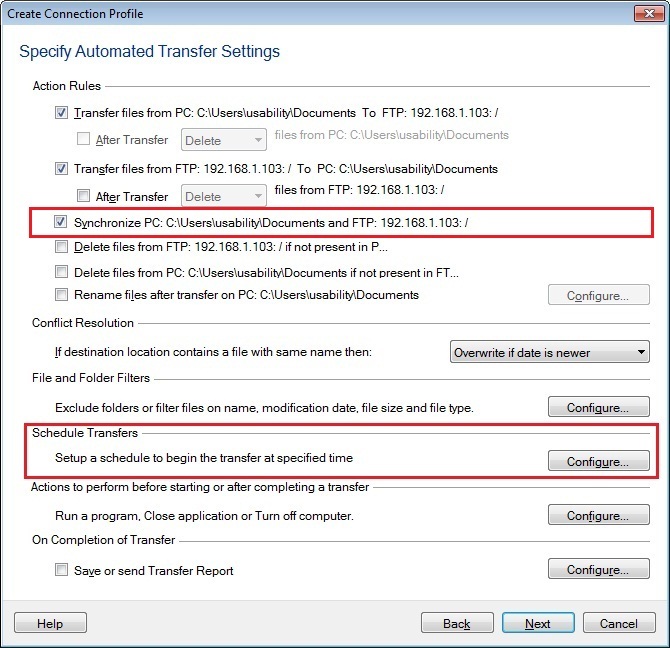
Under the Schedule Transfers section, click the Configure button. Select the schedule type as Daily with a repeat interval of a few minutes or hours as required. Click Ok to save your settings.
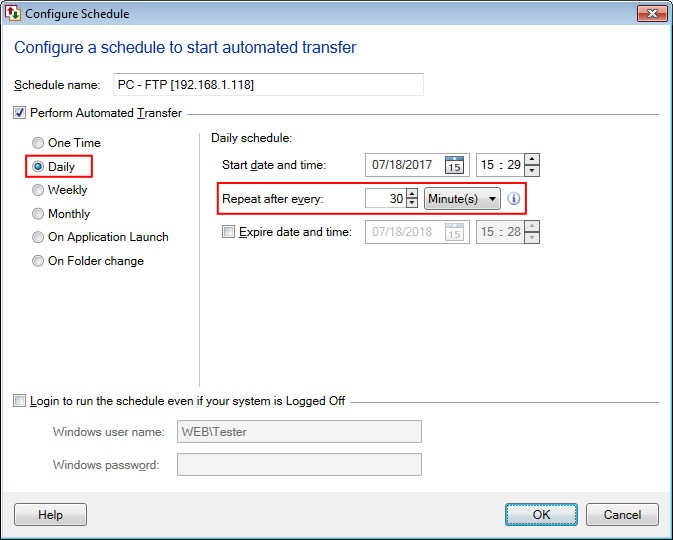
The schedule will run after every N minutes / hours and the selected folders will be synchronized each time. If the files are not present in one folder then they will be transferred from the other.
Hello! It looks like you're interested in this conversation, but you're not signed in.
Sign in with your Deskshare account to ask a question, reply, and get an email when someone answers. You will come back to exactly where you left off.
With your input, this post could be even better 💗
Register Login