Adding the camera name on video recordings
-
I have three USB cameras in use in WebCam Monitor. I want to put the camera names onto the recorded video. Is there any way to do this?
-
You can put a text label on the camera preview in WebCam Monitor. The text label can be the camera location or the name of the camera. It will be always visible on the camera preview and also shown in the recorded video.
To add a text label, click File >> Edit Webcam. Go to the Labels tab, select the Text Caption checkbox. Enter the text label to add and click Ok.
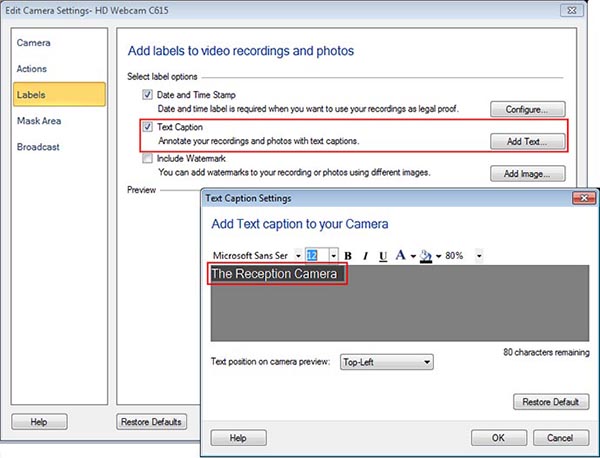
After adding labels, click on the **Record **button on the toolbar to start video recording. Note that the text label appears in the recorded video.
Hello! It looks like you're interested in this conversation, but you're not signed in.
Sign in with your Deskshare account to ask a question, reply, and get an email when someone answers. You will come back to exactly where you left off.
With your input, this post could be even better 💗
Register Login