Upgrading to the premium version to use mobile data for file transfers
-
I want to transfer files from my mobile to my PC but I don't have an active Wi-Fi connection. Can you please tell me, is there any way to transfer files?
-
If you don't have a Wi-Fi connection or your mobile and PC are in different networks, use mobile data to transfer files between your mobile device and PC with Mobile to PC File Transfer.
To use this connection type, you will need to purchase the Premium version of PC to Mobile Transfer. Go to Settings and click on the Mobile Data option under the 'Connection Type' section.
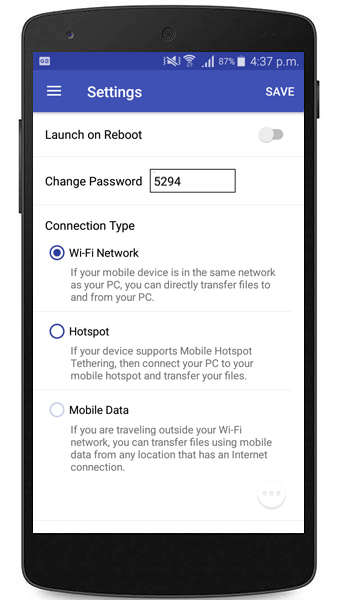
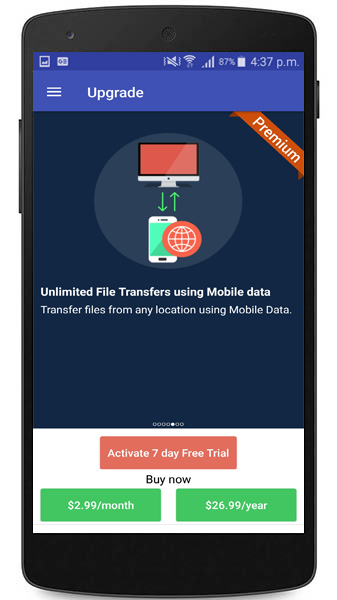
You should now have the upgrade screen on your mobile device. You can activate a monthly or yearly subscription as needed. Enter the details for activating the subscription.
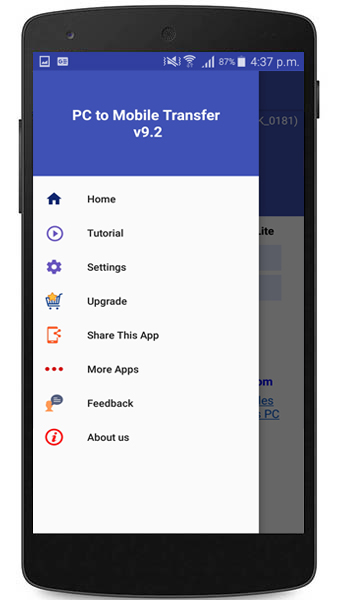
Another way to upgrade to the premium version is by clicking on the Upgrade button from the navigation drawer as shown below.
Once you have upgraded to the premium version, you can use the Mobile Data option to transfer your files.
To learn more about how to transfer files using mobile data, see our support forum:
Transfer files using mobile data when mobile device is beyond local Wi-Fi network
Hello! It looks like you're interested in this conversation, but you're not signed in.
Sign in with your Deskshare account to ask a question, reply, and get an email when someone answers. You will come back to exactly where you left off.
With your input, this post could be even better 💗
Register Login