Adding files or folders to queue for later transfer
-
I have created a 'PC to mobile device' connection profile in FTP Manager Lite. I want to transfer some files from my PC to mobile device but I do not want to transfer them immediately. Can I select those files for later transfer?
-
Use the Transfer Queue feature in FTP Manager Lite to queue files for later transfer.
If you have already created the connection profile, open File Manager and select the files or folder from your PC to transfer. Right click on the selected folder and select Add to Transfer Queue. All your selected files or folders will be listed in the Transfer Queue. The transfer will not start immediately.
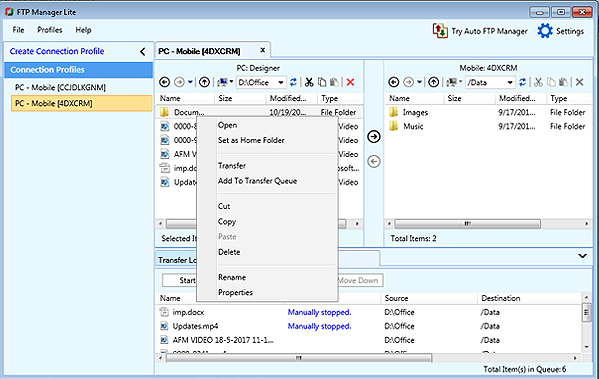
You can transfer the files in the queue when you are ready.
When you process the queue, FTP Manager Lite will automatically transfer files present in the transfer queue. The status of file or folder that is being transferred will be displayed in the log window.
Hello! It looks like you're interested in this conversation, but you're not signed in.
Sign in with your Deskshare account to ask a question, reply, and get an email when someone answers. You will come back to exactly where you left off.
With your input, this post could be even better 💗
Register Login