Automatically launch Mobile to PC File Transfer when my device restarts
-
I have a tablet I use to capture data that is saved to a local folder. I want Mobile to PC File Transfer to start immediately when my device restarts so I always have access to the new files. How can I do this using your app?
-
Use the Launch on reboot option in Mobile to PC File Transfer.
Just go to Settings, and enable the Launch on reboot option and save the settings.
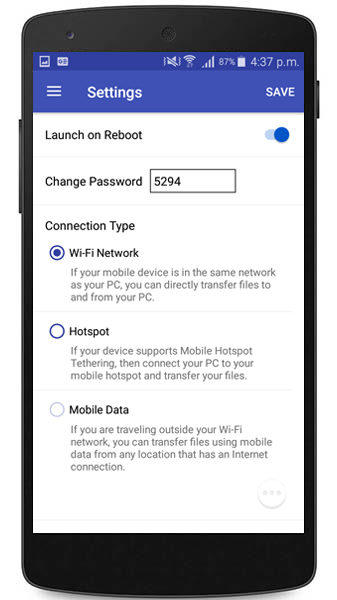
Next time when you start your mobile device, the application will automatically launch. No need to manually start the application. This will make sure you always have access to your device data.
Hello! It looks like you're interested in this conversation, but you're not signed in.
Sign in with your Deskshare account to ask a question, reply, and get an email when someone answers. You will come back to exactly where you left off.
With your input, this post could be even better 💗
Register Login