Enabling and disabling word highlighting in Text Speaker
-
I like the Text Speaker software and I am regularly using it to listen to eBooks. For my ebooks, I don’t want the text highlighting. Can I disable it and enable highlighting whenever required?
-
Text Speaker has a highlighting feature to focus on the word or character as it is read aloud. You can disable and enable this option whenever you need.
To disable the highlighting, go to the Settings dialog. On the General settings tab, uncheck the ‘Highlight words when reading’ option under ‘General Preferences’ section. Click OK to save the settings.
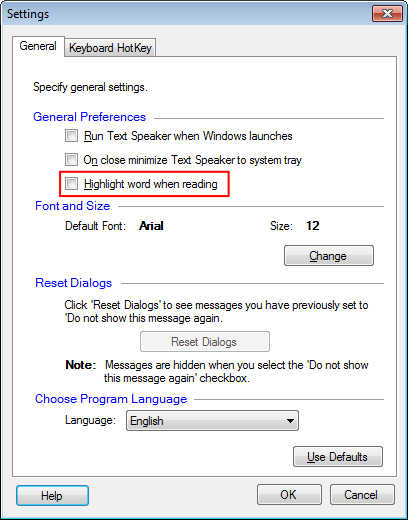
The next time when you start listening to your eBook the text will not be highlighted. You can enable the highlighting option from the settings whenever it is required.
-
Text Speaker has a highlighting feature to focus on the word or character as it is read aloud. You can disable and enable this option whenever you need.
To disable the highlighting, go to the Settings dialog. On the General settings tab, uncheck the ‘Highlight words when reading’ option under ‘General Preferences’ section. Click OK to save the settings.
https://www.deskshare.com/forums/images/posts/TSpost8891.jpg
The next time when start listening to your eBook the text will not be highlighted. You can enable the highlighting option from the settings whenever it is required.

Hello! It looks like you're interested in this conversation, but you're not signed in.
Sign in with your Deskshare account to ask a question, reply, and get an email when someone answers. You will come back to exactly where you left off.
With your input, this post could be even better 💗
Register Login