Update a few words from a text document and convert to audio daily
-
I want to use Text Speaker to create mp3 audio every day by updating a few words in a text file, specifically the day of the week and the time. Is there any way to quickly move to the section in the text file, update weekday and the time and then convert to mp3 audio?
-
Use the bookmarks in Text Speaker to get a quick reference to the position within your document to do your updates.
To add a bookmark, move to the desired position in the document and click Edit >> Add Bookmark. Assign a name for the bookmark. In your case, you can add bookmarks for a weekday and time. Click the Save icon on the tool bar to save the file.
Whenever you want to change the time and weekday in your text document, open it in Text Speaker and click Edit >> Go to Bookmark. Choose a bookmark from the dropdown. Update the weekday and time, and click Speak >> Convert Current File to Audio.
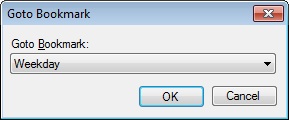
If you want to change a particular section in the text file regularly, you can use bookmarks to quickly move to that section.
Hello! It looks like you're interested in this conversation, but you're not signed in.
Sign in with your Deskshare account to ask a question, reply, and get an email when someone answers. You will come back to exactly where you left off.
With your input, this post could be even better 💗
Register Login