Launching a custom program when motion is detected in Security Monitor Pro
-
I have successfully added my cameras in Security Monitor Pro. I want to run my own program when a motion trigger event occurs. Can I use Security Monitor Pro to detect the motion and then start my program?
-
The Launch Program feature in Security Monitor Pro lets you run any program or a script when motion gets detected on camera. You can also send parameters to the program that you want to run.
To configure the launch program action, click on the Manage Camera icon on the tool bar. Select the camera from the list and click the Edit Camera button. On the Actions tab, click the Launch a Program check box. Click on Browse button and select a script file or an ‘.exe’ file. If required pass any parameters to the selected program. Click Ok and Save the settings.
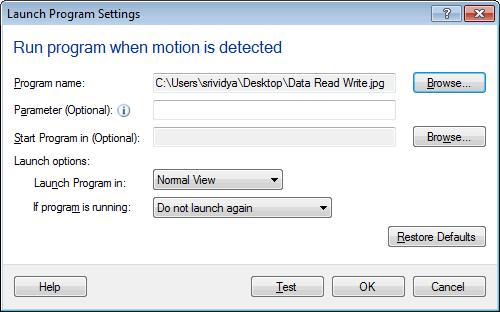
Once you configure the above settings, right click on the camera preview and start the monitoring action. When motion is detected, then your program will be launched.
Hello! It looks like you're interested in this conversation, but you're not signed in.
Sign in with your Deskshare account to ask a question, reply, and get an email when someone answers. You will come back to exactly where you left off.
With your input, this post could be even better 💗
Register Login