Slow down the voice speed while listening and creating audio
-
I like one of the voices on your website, but when I listen to the audio it sounds like it is speaking too quickly. I have tried creating an audio file, but that is also too fast. Please tell me if there is a way to slow the voice, both while listening and when creating a MP3.
-
You can slow down the reading speed for any of the Text Speaker voices.
To adjust the reading speed, click the Voice icon on the toolbar. On the Voice Options dialog, select the voice you want to use from the drop down list. Next, look for the 'Voice Settings' section and adjust Speed using the Slider. You can also adjust the Volume and Pitch level. Once you are done configuring settings, click the Test Settings button to verify how the text sounds.
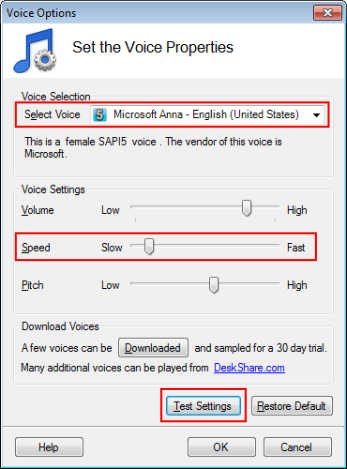
Click the Speak icon on the toolbar, you will able to hear the adjustments of text to speech settings.
Adjusting Text Speaker settings helps to make the voices more understandable and also creates a unique voice.
Hello! It looks like you're interested in this conversation, but you're not signed in.
Sign in with your Deskshare account to ask a question, reply, and get an email when someone answers. You will come back to exactly where you left off.
With your input, this post could be even better 💗
Register Login