Sending an email with a photo at regular intervals
-
Can I send an email from Security Monitor Pro with the photo captured from my IP camera every 10 minutes?
-
You can use regular interval monitoring in Security Monitor Pro to send an email notification after a fixed period of time. Photo of the activity are by default included within the email body.
Start by configuring the primary action. On the menu bar, click Camera >> Manage Cameras. Select the camera and click 'Edit Camera'. Go to the Actions tab and select 'At regular intervals' of 10 minutes.
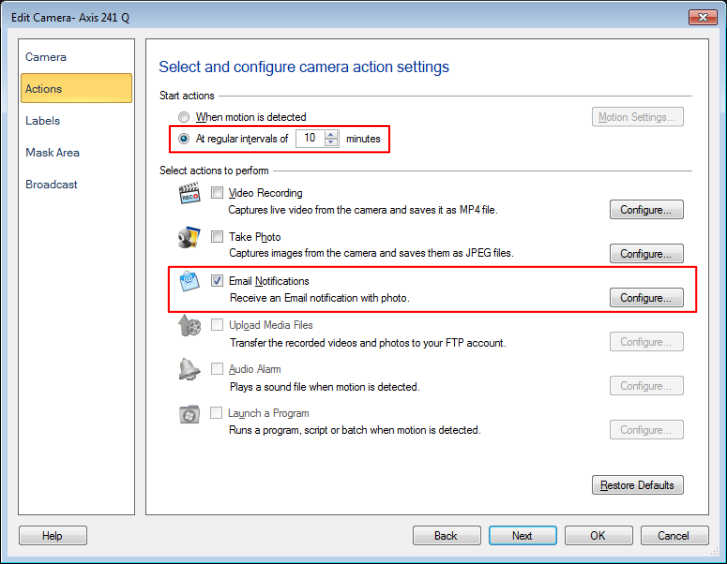
To configure email settings, select the Email Notification action and provide the details required for sending the email.
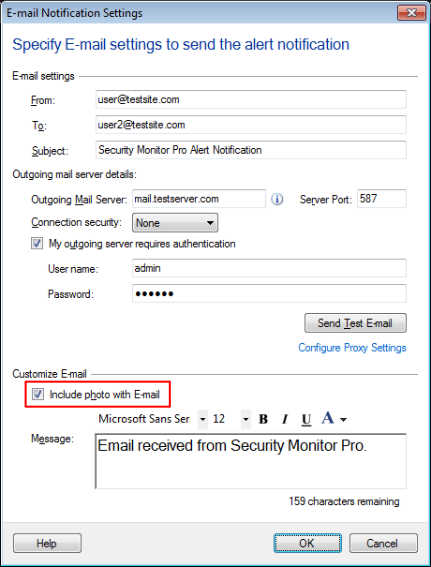
Once you complete the above settings, right click on the camera preview and select Start monitoring. An email notification will be sent every 10 minutes.
Hello! It looks like you're interested in this conversation, but you're not signed in.
Sign in with your Deskshare account to ask a question, reply, and get an email when someone answers. You will come back to exactly where you left off.
With your input, this post could be even better 💗
Register Login