Exclude specific files from downloading
-
I use Auto FTP Manager to download video and audio files from an FTP server. The folder I am transferring from also contains images. Can I skip the images but still download the other files?
-
You can easily exclude image files from getting downloaded using the advanced Filters option in Auto FTP Manager.
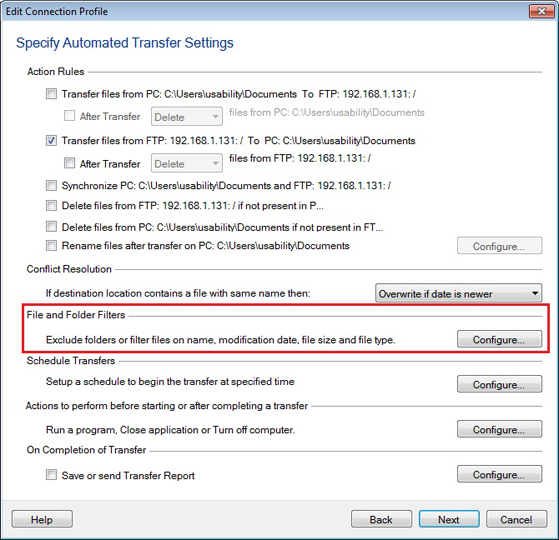
To configure filters, select the automated transfer profile, click Profiles >> Edit Profile option. Go to the 'Specify Automated Transfer Settings' page and click the Configure button under the ‘File and Folder Filters’ section.
Next, on the Configure Filters dialog, select the ‘File Type’ checkbox. Enter the image file extensions and click on the 'Exclude' button. This will add the extensions in the Exclude list on the right.
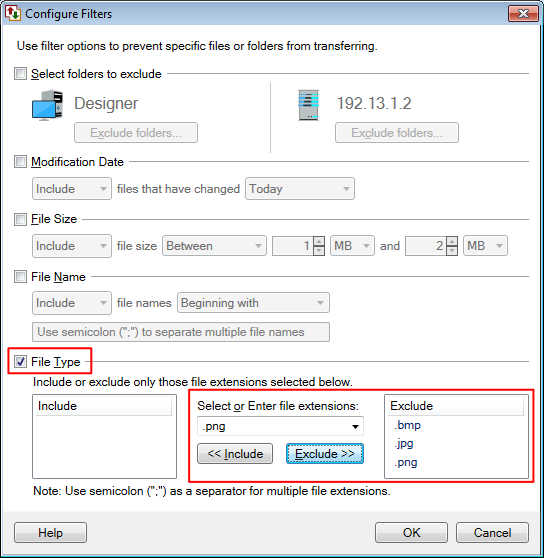
Now, when you start the automated transfer, manually or through a schedule, the image files will not be downloaded.
Hello! It looks like you're interested in this conversation, but you're not signed in.
Sign in with your Deskshare account to ask a question, reply, and get an email when someone answers. You will come back to exactly where you left off.
With your input, this post could be even better 💗
Register Login