Highlight moving objects on the camera preview
-
I use my USB camera for motion detection monitoring. Is there a way to highlight a moving object so I can see what is causing the motion trigger?
Thanks in advance…..
-
In WebCam Monitor you can configure motion highlighting from the Motion Settings.
To setup motion highlighting, right click on the camera preview and select ‘Edit Camera’. On the actions tab, click the ‘Motion Settings’ button. Select the checkbox to Highlight motion movements and choose a color from the drop down.
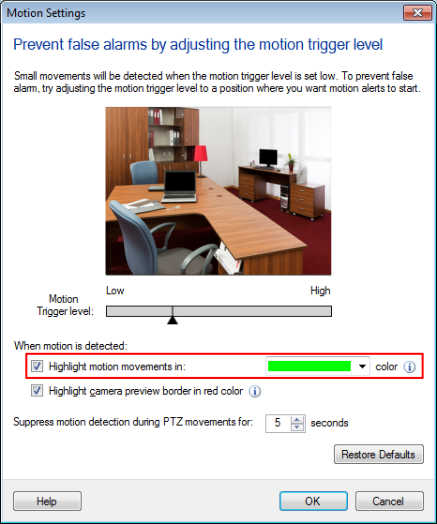
Click on the Monitor icon from the tool bar to start the monitoring action. Moving objects will be highlighted in the selected color on the camera preview as well as in Video Recordings and Photos.
Hello! It looks like you're interested in this conversation, but you're not signed in.
Sign in with your Deskshare account to ask a question, reply, and get an email when someone answers. You will come back to exactly where you left off.
With your input, this post could be even better 💗
Register Login