Using a 4 port video server device with Security Monitor Pro
-
I have 4 CCTV cameras attached to a Axis 4 port video server camera/device. I am able to see the preview from the first camera. How do I connect to the previews from the other cameras attached to the video server?
-
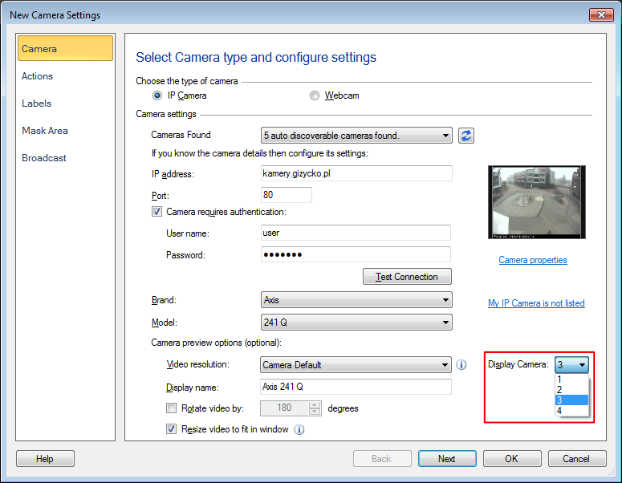
In order to see the preview from the other channels of the video server, you will need to select the correct Axis video server model in Security Monitor Pro.
Click on the Add camera option from the tool bar. Enter the camera IP address and connection information and select Axis as the brand, and the correct model from the dropdown list. When you select a camera model that is a video server, you will see and additional drop down list for ‘Display Camera:’. From the Display Camera list you can select the video server channel. Add the video server device multiple times, one for each channel you would like to preview.
If you don’t find your video server model listed in Security Monitor Pro, you can send a request to add support for your video server device here:
https://www.deskshare.com/camera-request.aspx
Hello! It looks like you're interested in this conversation, but you're not signed in.
Sign in with your Deskshare account to ask a question, reply, and get an email when someone answers. You will come back to exactly where you left off.
With your input, this post could be even better 💗
Register Login